
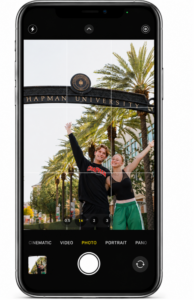
Adjust Your Settings
- Clean your lens before shooting to avoid blurry or hazy images
- Use the camera on the back of your phone for the highest quality
- Turn on grid lines to help with composition
- Disable any color or stylistic filters

Technical Tips
- Move closer to your subject instead of using digital zoom
- Hold your phone with both hands to reduce camera shake
- Tap the screen to set focus on your main subject
- On many phones, you can adjust exposure by swiping up/down after focusing
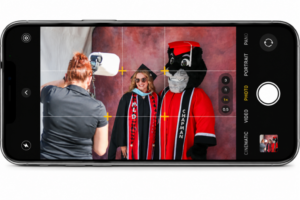
Composition
- Follow the rule of thirds: place key subjects at intersections of grid lines
- Leave some space rather than filling the frame with your subject
- Include context that identifies the location or activity
- Capture both “in action” shots and posed group photos
- This is how your eye scans according to the Rule of Thirds:


Orientation
- Capture both horizontal (landscape) AND vertical (portrait) shots of each scene
- Horizontal shots work best for website headers, publications and group photos
- Vertical shots are ideal for social media and mobile viewing
- Take multiple shots in both orientations

Lighting
- Natural light produces the best results
- Avoid shooting directly into bright sunlight
- For outdoor photos, find shade on bright days
- Indoors, position subjects near windows when possible
- Avoid using flash (except as a last resort in very dark situations)

Group Photos
- Position groups with light on their faces, not behind them
- Ask people to stand closer together
- Take multiple shots to catch everyone with eyes open
- For large groups, find elevated positions (stairs, hills)
- Make sure everyone is presentable before taking the photo. Do not use photos where someone is not presentable.

Action Shots
- Anticipate the moment before it happens
- Take multiple photos in quick succession
- Focus on faces and expressions that show engagement